

Parent Observer Code - Step-by-Step
- Observer/Parent Access to Canvas: Parents must begin by requesting a pairing code from their child's teacher or have their child log into Canvas to access the pairing code. Video how to Set up your parent Canvas Observer Account
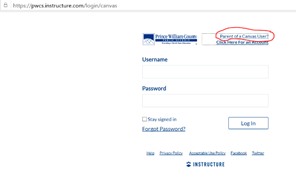
Step 1:Once parents receive their pairing code, they will need to sign up for a Canvas account. Parents will go to https://pwcs.instructure.com/login/canvas and select"Parent of a Canvas User" from the top right of the window
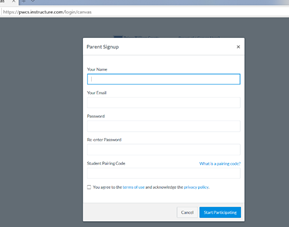
Step 2: Parents will enter the information requested including the pairing code provided to them by their child or their child's teacher.
Step 3: To add more students to observe, once logged in, parents will want to click on Account>Observing. Here, they can see who they are already linked to and add more children.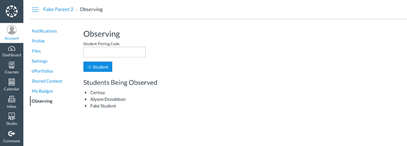
Once the account has been created, parents can use the Canvas Student App on their Apple or Android devices to access their account. When using the app, parents will select Prince William County Parents link when asked to "find school." The Canvas Student app and the Canvas Parent app are similar. Canvas has recommended that the Canvas Student app has a better layout.